Bold Ideas 2 My Desktop
A one-person passion project that turns your cluttered Windows desktop into a tiny living 3D world. Charming idea, rough edges, still worth watching your shortcut icons wander around a miniature map.
GamerScout Verdict
Worth a look for patient players who want a whimsical desktop companion, not a polished productivity replacement.
Compare Prices(3 stores)
Every store in this table quotes us in euros, so the EUR figure is the price the seller actually set, not our arithmetic — which is why EUR is also the currency we rank in. We only list an offer here when the store gives us its price in euros, so nothing in this table is a number we invented.
Pick USD, PLN, GBP, CAD or AUD in the header and we convert from EUR at the European Central Bank reference rate — converted amounts are prefixed with ~. Your bank or the store may apply a different rate at checkout. We never hide offers based on where you are: everyone sees this whole table.
We may earn a commission when you buy games through links on this page — at no extra cost to you. It never affects our rankings or verdicts.
Price History
Screenshots & Media
About Bold Ideas 2 My Desktop
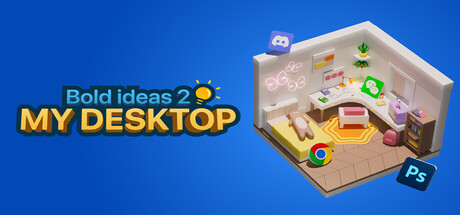
I have a soft spot for the kind of software that asks "what if file management was actually delightful?" and then attempts to answer that question with a 3D miniature world sitting on your Windows desktop. That is exactly what developer Lee is doing here, alone, with Bold Ideas 2 My Desktop, and the sincerity of the attempt matters before we get to any of the caveats. The core loop is simple and surprisingly tactile. You drag your daily-use files and folders into a chosen 3D map, and each one becomes an animated icon that wanders around that little world on its own, or occasionally sits down and naps. When you need to actually open something, you double-click its 3D representation and the file launches normally. The map library reportedly grew to over 20 environments by launch, which gives you real variety in how your miniature desktop looks and feels. The aesthetic lands somewhere between a tabletop diorama and a toy-box sim, and on a good day that is genuinely calming to have running in the background while you work. The honest part: Lee shipped this in a state that the developer freely admits needed more time. The UI was assembled for function rather than clarity, testing was cut short, and the version that went live carried bugs including icons clipping through map geometry and files occasionally failing to render correctly. There is no in-app tutorial to speak of; onboarding is handled through an external URL that opens on startup. For a tool you are supposed to trust with your daily workflow shortcuts, that roughness is not nothing. The Steam user base is small but sits at around 85 percent positive, which tells you the people who connected with the vision are willing to forgive the splinters. Who should try this? People who already have their actual productivity setup locked in and want something whimsical layered on top of it. Think of it as a desktop pet that also happens to be your file launcher. If you need reliability and polish above all else, you will find the current state frustrating. But if you can hold it lightly, accept that a solo developer is actively iterating, and appreciate the specific joy of watching your project folder icon fall asleep on a tiny map, there is something genuinely worth spending time with here. It sits in that honest, handmade category of software that a bigger studio would never greenlight, and that alone is a reason to pay attention.

Indie & narrative
Tags
System Requirements
Minimum
- OS
- Windows 10
- Memory
- 8 GB RAM
- Storage
- 1 GB available space
- Graphics
- RTX 2060
- Processor
- Intel i5
Keep exploring
Community Discussion
Be the first to comment on Bold Ideas 2 My Desktop.
Reviews & Ratings
No ratings available
Game Info
- Developer
- Lee
- Publisher
- Lee
- Release Date
- Aug 6, 2025