Easy Pose
If you draw people and still wrestle with foreshortening or hand positions, this 3D pose reference tool solves the problem faster than any wooden mannequin or stock photo hunt ever could.
Comparar precios(0 tiendas)
Cargando precios...
We may earn a commission when you buy games through links on this page — at no extra cost to you. It never affects our rankings or verdicts.
Capturas y multimedia
Acerca de Easy Pose
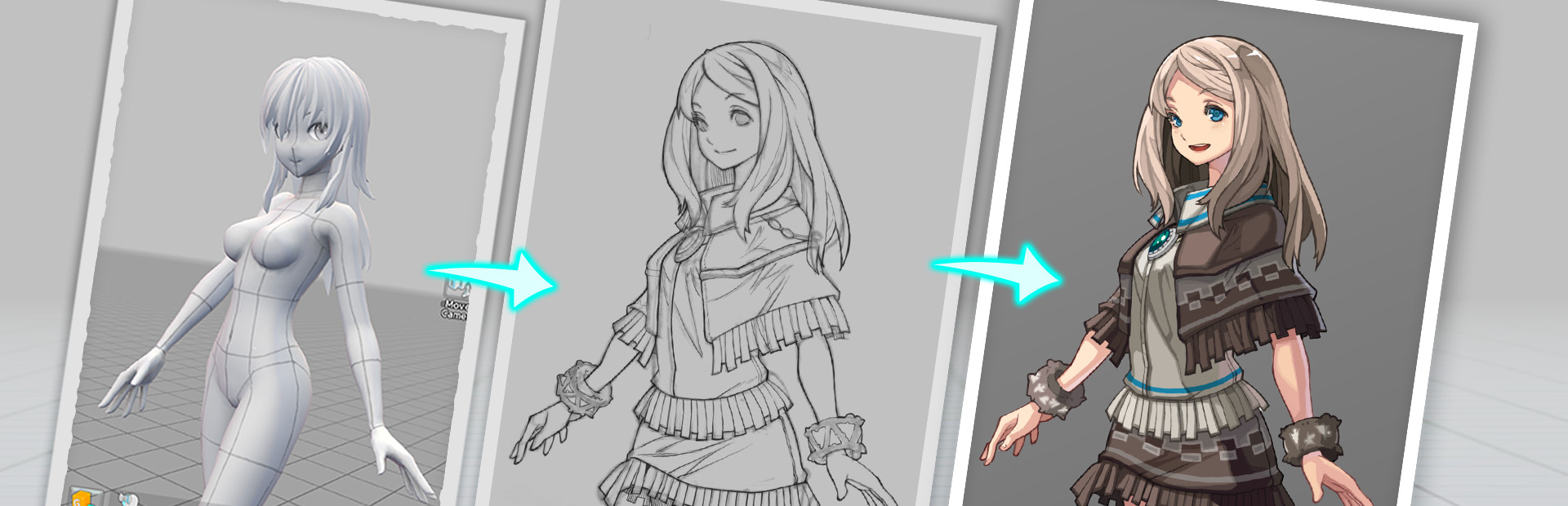
My first impression of Easy Pose was that it does exactly one thing, and it does that one thing well enough to earn its shelf space next to your drawing software. The premise is simple: instead of hunting stock photo sites or contorting a wooden doll, you load up a 3D human model, drag joints into whatever position you need, orbit the camera to your working angle, and screenshot it as a reference. That loop takes about thirty seconds once you know the interface, and the 3D gizmo plus slide panel controls make joint manipulation feel precise rather than fiddly. What separates Easy Pose from older pose tools is the character model range. Where most competitors defaulted to a single realistic eight-head-proportion figure, Easy Pose ships with body types that actually match the styles artists draw: four-head-ratio chibi figures, standard six-head men and women, a muscular male model, and more. If you are drawing webtoon, anime, or game illustration work rather than strict life studies, that variety matters a lot. The mirroring function is also a genuine time-saver for symmetrical poses, and the joint highlight system means you always know which limb you are about to move. The feature set goes further than basic posing. You can populate a scene with multiple models, apply over 200 accessories including hair, glasses, weapons and shields, and add prop environments ranging from classrooms to spaceships. There is an animation playback mode covering daily life, dance, and sports motions, and you can pause mid-animation to capture a frame as a pose reference, which is genuinely useful for dynamic action shots that are hard to construct manually. Lighting controls let you set direct and backlight intensity so your reference captures the shadow information you actually need for shading decisions. The rougher edges are worth knowing about. Easy Pose is still labeled Early Access on Steam, meaning the feature roadmap is not finished. Workshop pose sharing is listed as a planned feature rather than a live one, and the manual is mandatory reading before the interface fully clicks. The app has roots on mobile, which shows in the UI layout. It is workable on desktop but not as polished as tools built PC-first. None of these issues block the core workflow, but if you want a fully finished, desktop-native product, set expectations accordingly. The Steam review score sits firmly in Very Positive territory across nearly a thousand reviews, which is a reliable signal for a utility tool. Artists doing character work for illustration, webtoon, manga, or game development are the clear audience. Beginners learning human proportion will also get real mileage out of it. If you already own Clip Studio Paint's 3D figure tools or a comparable integrated solution, the overlap is high enough to check your existing toolkit first.

Catch-all
Etiquetas
Requisitos del sistema
Mínimos
- Memory
- 2 GB RAM
- Storage
- 600 MB available space
Recomendados
- Memory
- 4 GB RAM
- Storage
- 600 MB available space
Sigue explorando
Community Discussion
Be the first to comment on Easy Pose.
Reseñas y valoraciones
Información del juego
- Desarrolladora
- Madcat Games
- Distribuidora
- Madcat Games
- Fecha de lanzamiento
- 27 may 2026