Compara los precios de Bold Ideas 2 My Desktop en tiendas de claves de confianza y encuentra la mejor oferta. Desarrollado por Lee. Publicado por Lee. Lanzado el 6/8/2025. Disponible en PC. Géneros: Casual, Indie, Utilities.

A one-person passion project that turns your cluttered Windows desktop into a tiny living 3D world. Charming idea, rough edges, still worth watching your shortcut icons wander around a miniature map.

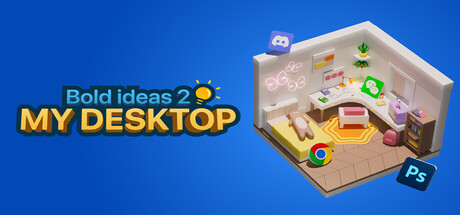
I have a soft spot for the kind of software that asks "what if file management was actually delightful?" and then attempts to answer that question with a 3D miniature world sitting on your Windows desktop. That is exactly what developer Lee is doing here, alone, with Bold Ideas 2 My Desktop, and the sincerity of the attempt matters before we get to any of the caveats. The core loop is simple and surprisingly tactile. You drag your daily-use files and folders into a chosen 3D map, and each one becomes an animated icon that wanders around that little world on its own, or occasionally sits down and naps. When you need to actually open something, you double-click its 3D representation and the file launches normally. The map library reportedly grew to over 20 environments by launch, which gives you real variety in how your miniature desktop looks and feels. The aesthetic lands somewhere between a tabletop diorama and a toy-box sim, and on a good day that is genuinely calming to have running in the background while you work. The honest part: Lee shipped this in a state that the developer freely admits needed more time. The UI was assembled for function rather than clarity, testing was cut short, and the version that went live carried bugs including icons clipping through map geometry and files occasionally failing to render correctly. There is no in-app tutorial to speak of; onboarding is handled through an external URL that opens on startup. For a tool you are supposed to trust with your daily workflow shortcuts, that roughness is not nothing. The Steam user base is small but sits at around 85 percent positive, which tells you the people who connected with the vision are willing to forgive the splinters. Who should try this? People who already have their actual productivity setup locked in and want something whimsical layered on top of it. Think of it as a desktop pet that also happens to be your file launcher. If you need reliability and polish above all else, you will find the current state frustrating. But if you can hold it lightly, accept that a solo developer is actively iterating, and appreciate the specific joy of watching your project folder icon fall asleep on a tiny map, there is something genuinely worth spending time with here. It sits in that honest, handmade category of software that a bigger studio would never greenlight, and that alone is a reason to pay attention. Kai, Scout Team

Bold Ideas 2 My Desktop
CasualIndieUtilities

Bold Ideas 2 My Desktop

6 ago 2025Lee
GamerScout opina

A one-person passion project that turns your cluttered Windows desktop into a tiny living 3D world. Charming idea, rough edges, still worth watching your shortcut icons wander around a miniature map.

PC
Mejor precio disponible
€0.00
en N/A
Mínimo histórico: €0.29

Comparar precios(0 tiendas)

Cargando precios...

We may earn a commission when you buy games through links on this page — at no extra cost to you. It never affects our rankings or verdicts.

Historial de precios

Historical low
€0.2922 Jun 2026
Keyshops
€0.28€0.31€0.33€0.365 Jun11 Jun17 Jun22 Jun28 Jun
Tracking prices since 5 Jun 2026
Create alert

Capturas y multimedia

Acerca de Bold Ideas 2 My Desktop

I have a soft spot for the kind of software that asks "what if file management was actually delightful?" and then attempts to answer that question with a 3D miniature world sitting on your Windows desktop. That is exactly what developer Lee is doing here, alone, with Bold Ideas 2 My Desktop, and the sincerity of the attempt matters before we get to any of the caveats. The core loop is simple and surprisingly tactile. You drag your daily-use files and folders into a chosen 3D map, and each one becomes an animated icon that wanders around that little world on its own, or occasionally sits down and naps. When you need to actually open something, you double-click its 3D representation and the file launches normally. The map library reportedly grew to over 20 environments by launch, which gives you real variety in how your miniature desktop looks and feels. The aesthetic lands somewhere between a tabletop diorama and a toy-box sim, and on a good day that is genuinely calming to have running in the background while you work. The honest part: Lee shipped this in a state that the developer freely admits needed more time. The UI was assembled for function rather than clarity, testing was cut short, and the version that went live carried bugs including icons clipping through map geometry and files occasionally failing to render correctly. There is no in-app tutorial to speak of; onboarding is handled through an external URL that opens on startup. For a tool you are supposed to trust with your daily workflow shortcuts, that roughness is not nothing. The Steam user base is small but sits at around 85 percent positive, which tells you the people who connected with the vision are willing to forgive the splinters. Who should try this? People who already have their actual productivity setup locked in and want something whimsical layered on top of it. Think of it as a desktop pet that also happens to be your file launcher. If you need reliability and polish above all else, you will find the current state frustrating. But if you can hold it lightly, accept that a solo developer is actively iterating, and appreciate the specific joy of watching your project folder icon fall asleep on a tiny map, there is something genuinely worth spending time with here. It sits in that honest, handmade category of software that a bigger studio would never greenlight, and that alone is a reason to pay attention.

Kai
Kai · Scout Team

Indie & narrative

Etiquetas

singleplayertier:sub-5Desktop Utility3D IconsFile LauncherDesktop CustomizationSolo DeveloperWork-from-Home ToolAmbient Desktop

Requisitos del sistema

Mínimos

OS
Windows 10
Memory
8 GB RAM
Storage
1 GB available space
Graphics
RTX 2060
Processor
Intel i5

Sigue explorando

Community Discussion

Be the first to comment on Bold Ideas 2 My Desktop.

Reseñas y valoraciones

No hay valoraciones disponibles

Información del juego

Desarrolladora
Lee
Distribuidora
Lee
Fecha de lanzamiento
6 ago 2025

Alerta de precio

¡Recibe un aviso cuando el precio baje de tu objetivo!

Crear alerta

Compra mejor: guías útiles

Preguntas frecuentes sobre Bold Ideas 2 My Desktop

¿Cuánto cuesta Bold Ideas 2 My Desktop?

El precio de Bold Ideas 2 My Desktop cambia a menudo y varía según la tienda, la edición y la región. La tabla de precios en vivo de esta página compara las ofertas más baratas en stock de tiendas de claves de confianza como Eneba y Kinguin, para que siempre veas el precio más bajo actual antes de comprar.

¿Dónde puedo comprar Bold Ideas 2 My Desktop más barato?

Compara los precios de Bold Ideas 2 My Desktop en todas las tiendas verificadas en la tabla de precios de esta página. Listamos las ofertas de claves y tiendas más baratas en stock, actualizadas con frecuencia, para que siempre veas la mejor oferta actual antes de comprar.

¿En qué plataformas está disponible Bold Ideas 2 My Desktop?

Bold Ideas 2 My Desktop está disponible en PC.

¿Cuándo se lanzó Bold Ideas 2 My Desktop?

Bold Ideas 2 My Desktop se lanzó el 6 de agosto de 2025.

¿Quién desarrolló Bold Ideas 2 My Desktop?

Bold Ideas 2 My Desktop fue desarrollado por Lee.